Engineering NotesXML: How We Build, Test, and Ship Quality Software
IWV Digital Solutions LLC
By IWV Digital Solutions — April 2026
NotesXML is a cross-platform note-taking application with integrated on-device AI. It runs on Android, Windows, and Linux — all from the same codebase. We build it to the standard we’d want from the tools we use ourselves: reliable, private, and thoroughly tested before it reaches your device.
This article describes how we approach software quality at IWV Digital Solutions — from how we structure our builds and manage error diagnostics, to how we verify that every release works correctly across all three platforms.
One Codebase, Three Platforms
NotesXML is built from a single source tree. The same application logic, the same AI engine integration, the same editor — all shared across Android, Windows, and Linux. Platform-specific code exists only where the operating system requires it: file system access, native menus, hardware-specific optimizations. Everything else is shared.
This matters because it means a bug fix or a new feature is written once and tested everywhere. There is no “Windows version” maintained separately from an “Android version” that drifts out of sync. When we ship a release, all platforms receive the same capabilities at the same time.
Our build system produces all platform artifacts — Android APKs, Windows installers and portable executables, and Linux AppImages — from a single build invocation. The system automatically synchronizes version numbers across every build target so that the version you see in the app always matches what was tested and released.
Build Phases: Development, Beta, and Production
Every NotesXML build is tagged with a build phase that controls how the application behaves:
Development builds are what our engineering team uses day-to-day. They include full diagnostic output, developer tools, and internal test harnesses. These builds are never distributed outside the development team.
Beta builds are distributed to our beta testing program. They include enhanced diagnostic logging that helps testers provide useful feedback, while removing developer-only tools that aren’t relevant to real-world use. Beta builds also carry a time window — they’re designed to be replaced by the next beta or by the production release, ensuring testers always run current software.
Production builds are what you download from Google Play, the Microsoft Store, or our website. They are hardened: diagnostic output is minimized to what’s needed for support troubleshooting, developer tools are removed entirely, and the application is optimized for performance and stability.
This phased approach means that features are exercised first in development, then validated by real users in beta, and only then promoted to the production channel. Nothing reaches your device without passing through both gates.
Error Logging: Diagnostic Without Exposure
Software logging is a balancing act. Too little, and support issues become unsolvable. Too much, and you risk exposing sensitive information or degrading performance. NotesXML takes a deliberate approach to both sides.
What we log. NotesXML records operational events — application startup, feature activation, AI model loading, file operations — at a level of detail appropriate to the build phase. Development builds are verbose. Production builds record only what’s necessary to diagnose a problem if something goes wrong.
What we never log. NotesXML includes a log sanitization layer that actively prevents sensitive information from appearing in diagnostic output. Credentials, authentication tokens, file contents, and personal data are filtered before they reach the log. This is enforced at the infrastructure level, not by individual developers remembering to be careful — the sanitizer runs automatically on every log entry.
Where logs stay. All diagnostic logs are stored locally on your device. NotesXML has no telemetry, no crash-reporting service, and no analytics backend that receives your data. If you contact support with an issue, you choose what to share. We never collect it automatically.
Platform-aware routing. Because NotesXML runs on three platforms, the logging system is aware of each platform’s diagnostic capabilities and routes output appropriately. On desktop, logs are written to a local file in a standard location. On Android, logs integrate with the platform’s own diagnostic system. On all platforms, the same information is captured — only the routing differs.
Testing: Automated, Thorough, and Multi-Layered
We test NotesXML using a combination of automated scripts that run inside the application, external testing tools, and focused manual verification. Each layer catches different categories of issues, and the combination gives us confidence that releases are solid across all platforms.
Built-In Self-Test Suite
Development builds of NotesXML include an embedded automated test suite that runs inside the application itself — on the same rendering engine, the same platform bridges, and the same file system that the released application uses. This is not a separate test harness running in a simulated environment; it exercises the actual application. The suite is part of our internal engineering tooling and is stripped from the Beta and Production builds you install, per the build-phase controls described above.
The self-test suite covers core functionality: note creation and editing across all supported note types, file operations (save, load, import, export), platform detection, the editor engine, and foundational UI behavior. It runs without any user interaction and produces a structured test report — saved as a NotesXML notebook — that documents every check and its result.
Because the self-test runs inside the application, it catches a category of bugs that external testing tools miss: issues that only appear when the full application stack is assembled and running on a specific platform. A function might pass a unit test in isolation but fail when a different rendering engine processes it on a different platform. The self-test catches that.
Feature-Specific Test Scripts
Beyond the core self-test, NotesXML maintains a catalog of standalone test scripts that target individual subsystems in depth. Each script exercises one area of the application thoroughly:
- Markdown and rich text rendering — verifying that every supported formatting element (headings, lists, tables, code blocks, math expressions, and dozens more) renders correctly across both rendering engines.
- AI inference and vision — exercising the on-device AI pipeline end-to-end: model loading, text generation, image analysis, and response quality across multiple models.
- Licensing and feature access — confirming that Free and Professional tier boundaries are enforced correctly and that upgrades activate the right capabilities.
- Cloud sync — testing the synchronization pipeline for Google Drive and Dropbox across conflict scenarios, partial uploads, and network interruption recovery.
- Encryption — verifying that encrypted notebooks are protected correctly and that key management works across all platforms.
- Import and export — testing round-trip fidelity for every supported format.
These scripts are maintained alongside the application source code and updated with every release. When a new feature ships, a corresponding test script ships with it.
All of these scripts run under a Test Orchestrator that is part of our Development-build engineering tooling — like the self-test suite, it is not present in the Beta and Production builds you install. During release checkout, a single command executes the entire catalog in sequence and writes the results into a NotesXML notebook — one detail page per script, plus a summary page showing every script, its pass/fail counts, and its duration. The screenshot below is from the actual release checkout of Beta 5.141.94 on a Linux desktop: 16 scripts executed, more than 1,400 individual checks, every script passing, in under two and a half minutes.
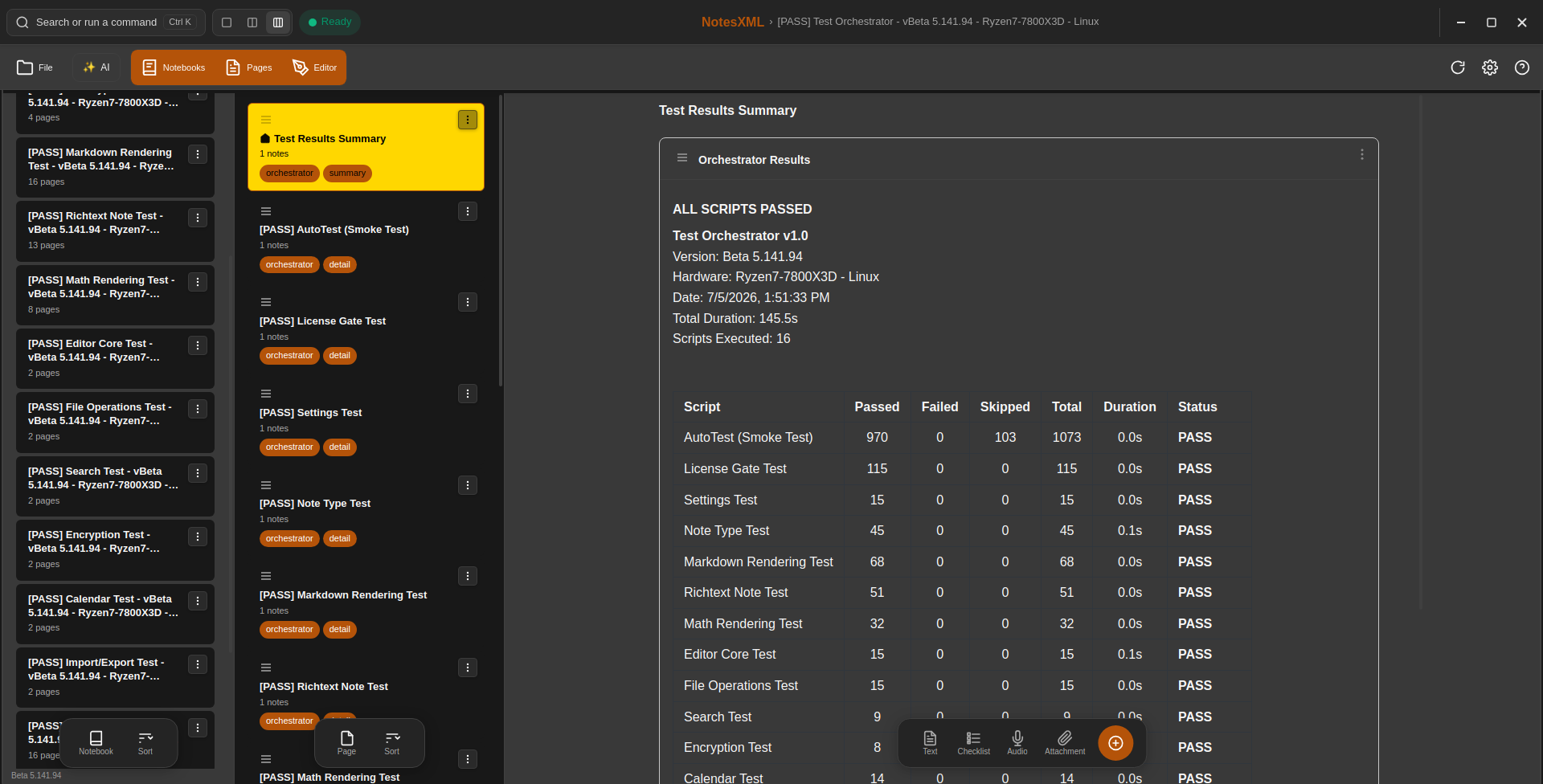
The Test Orchestrator summary from the Beta 5.141.94 release checkout, running in a Development build on Linux. Results are saved as a NotesXML notebook, so the test report is itself a searchable, exportable document.
AI Model Benchmarking
NotesXML ships with 16 AI models spanning multiple capability tiers, from lightweight models that run on phones to desktop-class models for advanced document analysis. Each model is benchmarked on real hardware using an automated benchmark suite that measures load time, inference speed, response quality, and memory consumption.
The benchmark suite runs the same workload across every supported model on every target device — from a Samsung Galaxy S24 Ultra to a desktop with a dedicated GPU. This ensures that the model catalog accurately represents what each model can do on real hardware, and that the RAM and storage estimates shown in the app are trustworthy.
The benchmark suite, like the test orchestration above, is part of our Development-build tooling — it is how we qualify models and hardware during release checkout, not a feature of the released application. The engineer selects which installed models to include — the dialog shows each model’s capability tier, RAM requirement, and download size — and the suite does the rest:
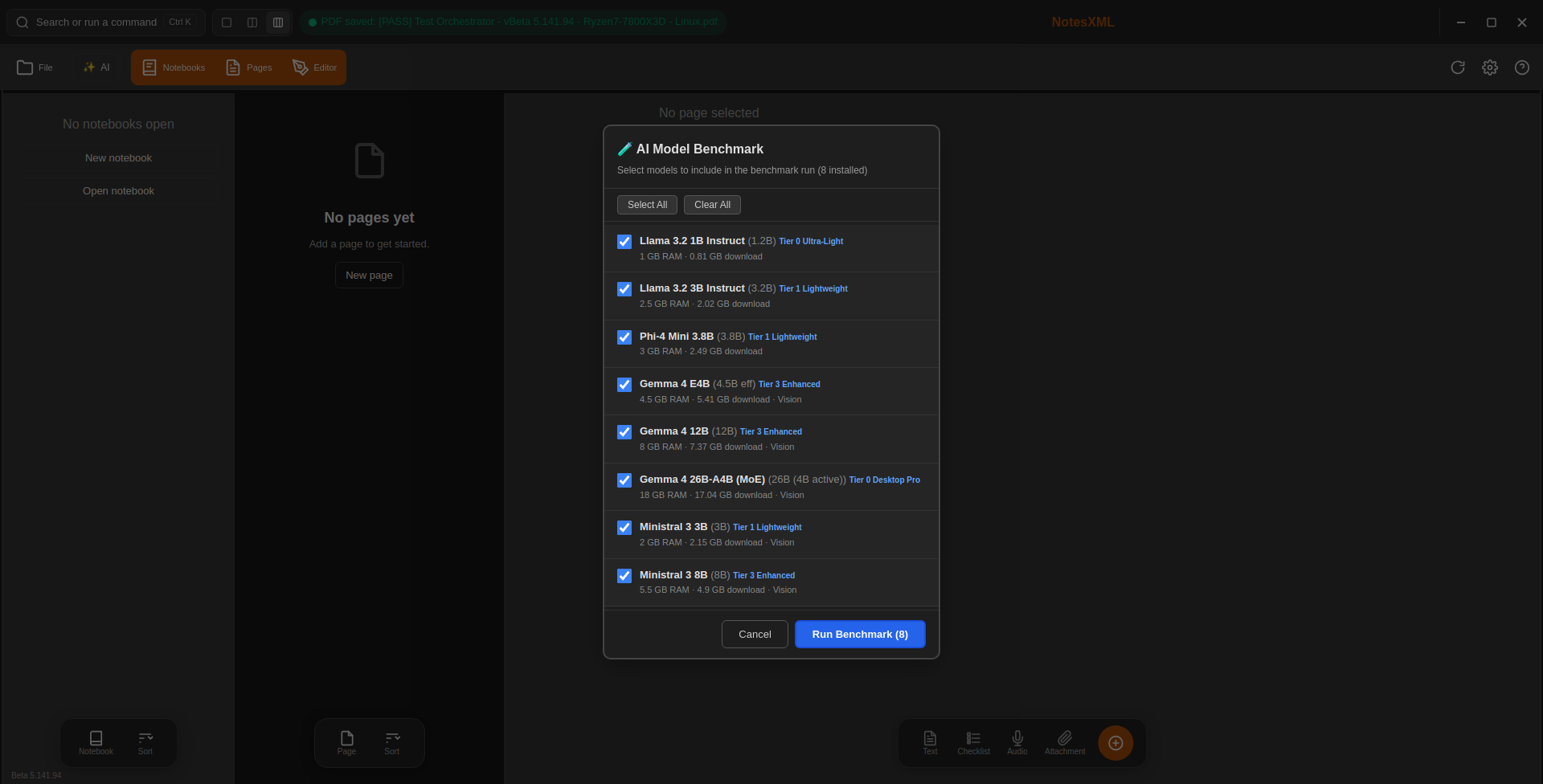
Selecting models for a benchmark run during the Beta 5.141.94 release checkout (the catalog held eight models at that time; it now holds ten). Each entry shows the model’s tier, RAM requirement, download size, and vision capability.
Each model is loaded, exercised, graded, and unloaded in turn — measuring tokens-per-second for text and vision workloads and assigning each model a quality grade. The results are written to a notebook, and the suite finishes with a hardware-specific recommendation: which model offers the best balance of speed and quality on that machine. Those measurements feed the RAM estimates and model guidance you see in the released app. The screenshot below shows a completed run from the Beta 5.141.94 release checkout (the catalog held eight models at that time):
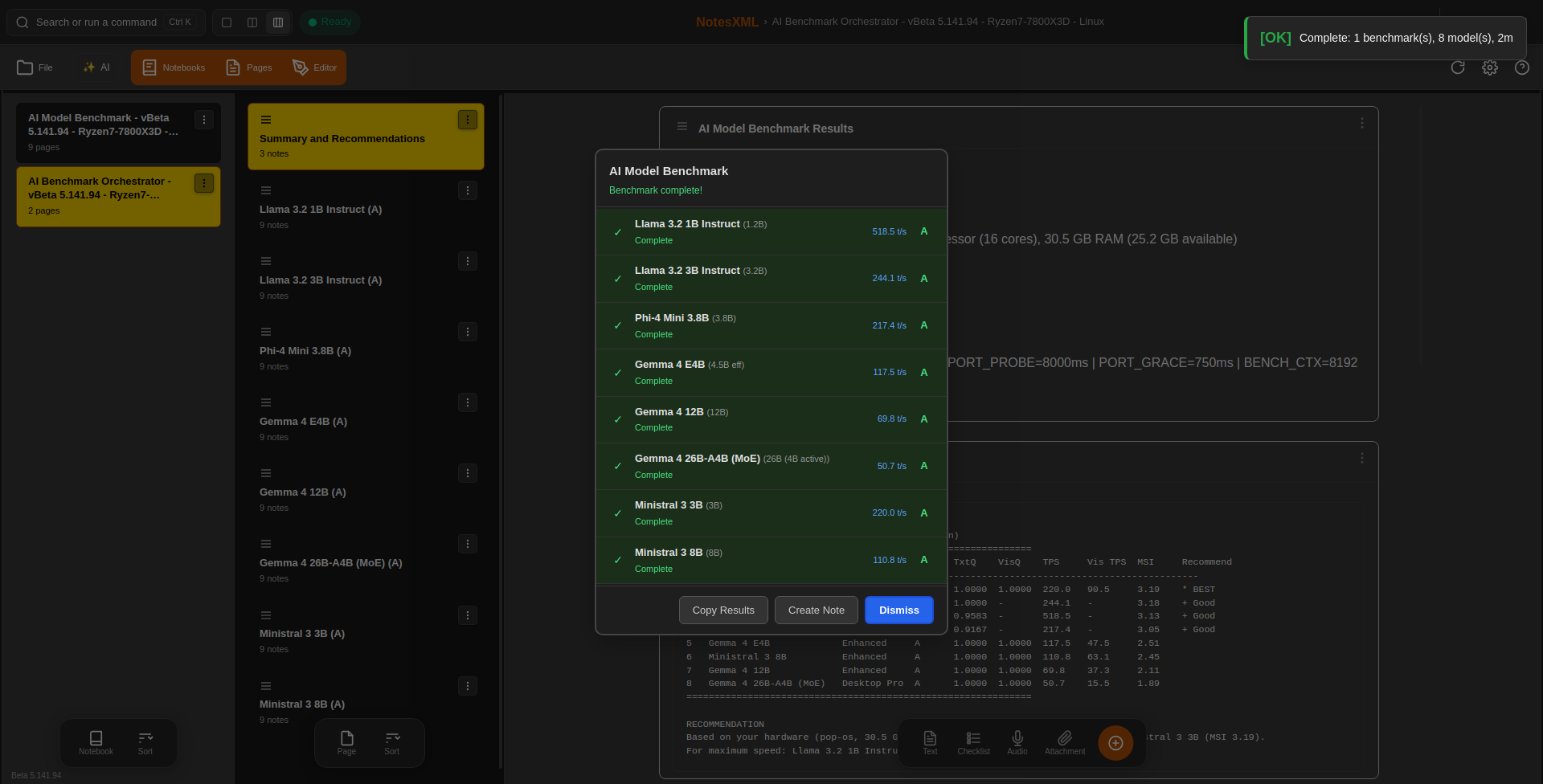
A completed benchmark run from the Beta 5.141.94 release checkout: the then-current eight-model catalog measured for speed and quality on the same hardware, with results saved as a notebook and a per-machine recommendation.
Here is the same in-app benchmark run against the 10-model catalog of that period, from the Beta 5.142.19 release checkout (9 Jul 2026, desktop CPU). TxtQ and VisQ are normalized text and vision quality scores (0–1). MSI is the Model Suitability Index — the suite’s combined speed/quality figure used to pick the per-machine recommendation:
| # | Model | Grade | TxtQ | VisQ | TPS | Vis TPS | MSI |
|---|---|---|---|---|---|---|---|
| 1 | Ministral 3 3B (recommended) | A | 1.0000 | 1.0000 | 221.8 | 90.0 | 3.19 |
| 2 | Llama 3.2 3B Instruct | A | 1.0000 | — | 256.8 | — | 3.18 |
| 3 | Llama 3.2 1B Instruct | A | 0.9583 | — | 549.1 | — | 3.13 |
| 4 | Gemma 4 E2B | A | 0.9583 | 1.0000 | 196.8 | 59.7 | 3.09 |
| 5 | Phi-4 Mini 3.8B | A | 0.9167 | — | 224.3 | — | 3.05 |
| 6 | Gemma 4 E4B | A | 1.0000 | 1.0000 | 117.9 | 41.0 | 2.51 |
| 7 | Ministral 3 8B | A | 1.0000 | 1.0000 | 115.5 | 57.3 | 2.49 |
| 8 | Ministral 3 14B | A | 1.0000 | 1.0000 | 76.3 | 45.1 | 2.15 |
| 9 | Gemma 4 12B | A | 1.0000 | 1.0000 | 68.6 | 35.2 | 2.10 |
| 10 | Gemma 4 26B-A4B (MoE) | A | 1.0000 | 1.0000 | 43.4 | 15.8 | 1.83 |
In-app AI Model Benchmark, Beta 5.142.19 release checkout (7/9/2026). All 10 catalog models earn Grade A. On this machine the suite recommends Ministral 3 3B (MSI 3.19). MSI weighs raw speed more heavily than the article-level HMS ranking does, so the two orderings differ by design — MSI answers “what should this machine run?”, HMS answers “which model balances speed and quality best overall?”
Manual Testing
Some things resist automation. We manually test every release on physical hardware across all three platforms, with particular attention to:
- Cross-platform visual consistency — ensuring the same notebook looks right on a phone, a laptop, and a Linux desktop.
- Hardware-specific behavior — Samsung DeX mode, external keyboard support, high-DPI displays, accessibility features.
- Real-world workflows — creating notebooks, importing documents, running AI analysis, syncing to cloud storage, and exporting to PDF, exercised as a connected sequence rather than isolated operations.
- Edge cases — very large notebooks, notes with unusual formatting, simultaneous operations, and recovery from interruption.
Time-Efficient Testing
The combination of built-in self-tests, feature-specific scripts, and targeted manual testing gives us broad coverage without requiring weeks of manual QA for every release. The automated layers handle the repetitive verification — hundreds of checks across all platforms in minutes — while manual testing focuses on the judgment-intensive scenarios that automation handles poorly. This lets us release frequently without compromising quality.
The Result
Every NotesXML release that reaches you has been:
- Built from a single, version-controlled source tree with no platform-specific forks
- Assembled through a build system that enforces version consistency across all platforms
- Hardened to the production build phase with appropriate diagnostic controls
- Verified by an automated self-test suite running inside the actual application on every target platform
- Exercised by feature-specific test scripts covering rendering, AI, sync, encryption, import/export, and licensing
- Benchmarked on real hardware for AI model performance
- Manually verified on physical devices across Android, Windows, and Linux
We build NotesXML this way because we believe the tools you rely on should be built with care. Your notes, your documents, your work — they deserve software that’s been thoroughly tested before it reaches your hands.
NotesXML is developed by IWV Digital Solutions LLC. Learn more at iwvdigitalsolutions.com.
© 2026 IWV Digital Solutions LLC. All rights reserved.
← Back to Articles